Monday, 18 April 2016

TMC-1 Updates - Talkback Auto-Resume, SPL setting, SPL, Gain and Dolby Level

We recently supplied a TMC-1 to NRK who came back with one great quote and two suggestions for improvement.

"First, let me say I´m liking the TMC-1 more and more ! 
Great product,and it definitely fills a need in our small/mid-size rooms."
Olav Celius, NRK

The two suggestions for improvement were
1) The auto-talkback did not work in the same way as the Avid ICON
2) The NRK rooms are calibrated at 68 not 85 SPL how to use the CAL-A or CAL-B to display this?

Auto Resume Talkback
To replicate the ICON auto talkback I have added a new user key, "A/R T/B" (Auto-Resume TalkBack), when [A/R T/B] is enabled, if talkback is enabled then entering play will disable talkback and stop will resume talkback.

Room calibration
Both analog and digital monitoring systems are optimised for 0dB gain at the reference level. Whilst it is possible to reduce the gain by 17dB this would decrease the signal to noise ratio by the 17dB - not an ideal solution.  I have added a new advanced menu to set the displayed SPL at 0dB gain in 2dB steps from 85 down to 63 SPL.

SPL, Gain and Dolby Level
I added a menu to allow the user to select the main display mode as SPL, Gain or Dolby level. Good for explaining how to calibrate the SPL Level and Great for when the producer requests a setting of Dolby 7 (85dB SPL).

Friday, 18 March 2016

ATMOS - 9.1 Bed - PD-1

This week I have spoken to Ray Gillon and Bruce Emery about the current Dolby thinking on Mixing for ATMOS. The concept seems to be to record a 9.1 Bed (7.1+top left and top right) onto which the objects are added. If using stems and a 'Pec-Direct' his may require 9.1 stems to build the mix.

As the PD-1 is currently configured for 7.1 stems I can upgrade the PD-1 firmware to allow 16 track stems in two banks. I would be very interested in any input on this and for any other suggestions.


Thursday, 4 February 2016

Using Xpand with XMon to Implement 9.1.2 or 7.1.4


The Xpand surround control unit may be configured for different monitor formats.  Currently we can implement the three following selections, there may be more that we will need to implement in the future! In all modes the outputs are only enabled when both main Input and Main Output are selected,  the outputs follow the master gain control and have individual gain trims and mutes.

Eight Channel
8 additional channels with no surround control or bass extension.

5.1/7.1/7.1.4 or 5.1/7.1/9.1.2
In these modes Xpand includes speaker routing for 5.1 and 7.1 as well as 7.1.4 or 9.1.2. Summing and Low Pass is also provided for rear left and right surround bass extension,


To switch from 7.1.4 to 7.1 - Xpand turns off top speakers
To switch from 7.1 to 5.1 - Xpand connects Rear speakers to Left and Right Surround and adjust surround levels.


To switch from 9.1.2 to 7.1 - Xpand turns off top speakers, connects Front surrounds to Left and Right Surrounds and adjust Surround Levels

To switch from 7.1 to 5.1 - Xpand connects Rear speakers to Left and Right Surround and adjust surround levels.

The 5,1, 71, and Rear BassX are available as user keys on the TMC-1 or on the Xpand App. You can select the speaker layout from the TMC-1 Menu or from the Xpand App.


Saturday, 30 January 2016

XPand: A new product derived from the AMon Monitoring Interface

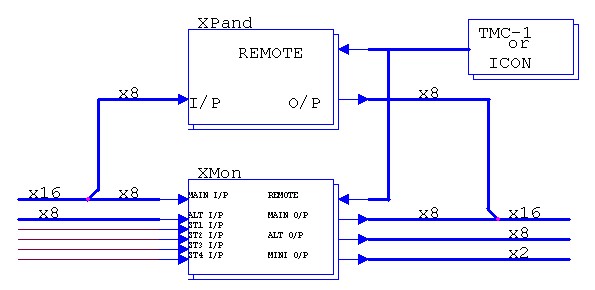
For the past two weeks I have been working on the software for the AMon (our new analog front end for the TMC-1). Whilst working on this we have received requests for a low cost way of adding Dolby Atmos or Auro 3D to an existing XMon system. Using the AMon hardware the XPand IU rack mount unit will add 8 channels to and existing XMon or AMon system. This will provide one input and one output with up to 16 channels.

Using XPand with the XMon and TMC-1
The XPand monitors the commands to the XMon, the dim, mute and gain follow the XMon commands.The XPand outputs are enabled when both main input and main output are selected.

Four  inputs are enough for the top speakers, by adding some switching to the XPand the remaining four inputs on XPand can be used to switch the rear speakers between 5.1 and 7.1 The TMC-1 has a user switch for this which also adjusts the surround output trim to compensate for any level change.
Using XPand to switch the surround speaker configuration between 5.1 and 7.1

When controlled by the TMC-1 individual speaker trims are available with individual speaker naming available from the USB port. When controlled by a ICON console the speaker trims can be adjusted via the USB port.

We are beta testing both the XPand and AMon in March provided the metalwork arrives on time.

Wednesday, 13 January 2016

A tale of four Cables Update

VGA DDC Cables should work, unfortunately not all work. We have found a source of cables that work, so far we have tested the 5m and 7m cables both of which work. We have ordered a stock of 7m cables and a sample of the 10m cable to test After our experience with a different brand of cable (see below) we ae testing all cables before shipping!

Our original tests
After testing 4 different cables we chose the best, the sample cable was only 3 meters long, we then bought a number of 5m cables for stock only to find when we tested them that they did not work! If you are purchasing your own cable be warned - some VGA cables are more equal than others.


Wednesday, 6 January 2016

TMC-1-Dmon: Trinnov D-Mon Remote

I have been working on the TMC-1-DMon software for the past week - it looks like I will be able to release it next week.

The TMC-1-DMon interfaces with the D-Mon via ethernet using the same protocol as the web browser interface. This will allow us to add functionality whenever Trinnov updates their software.

The initial version is an improvement on the TMC-1-Xmon interface providing added functionality and using tallies from the D-Mon allowing changes made on the web browser interface to be reflected on the TMC-1.

For the interface to function correctly the D-Mon mut be setup with the same framework as the TMC-1, the user can assign the input and output ports as required - (not all ports have to be connected). The screen shot below shows the main web browser display with the three cue inputs hidden.


The TMC-1-DMon will be the same price as the TMC-1-Penta and existing users of the TMC-1-XMon can purchase a software upgrade,

Tuesday, 22 December 2015

New Film Monitor Module - a Work in progress

It is the run up to Christmas, tomorrow we should receive a DMon which I will look at over the break in order to develop the ethernet interface between DMon and the TMC-1.

Whilst waiting for the DMon to arrive I worked on our new Film Monitor Module. Below is a picture of the new unit, still waiting for the front panel overlay but with fully working software.


The film monitor module is the same size as a Avid S6 fader module and may be used stand alone or in the S6. The module includes both the PD-1 and TMC-1, although separate they work together. The Pec Direct can read and build stems from Protools track name information and pass this information to the TMC-1. I plan to add an option to implement the pec/direct monitor functions in the NTP DAD AX32/Penta 720.

The monitor controller is identical to the stand alone TMC-1, the pec-direct section is based on the PD-1. To fit the pec-direct some compromises were necessary, even after saving as much space as possible I still had to lose 3 switches on the left which will involve changes in the functions of the three master switches on the right. The other obvious change is the new OLED display, big, bright and a great viewing angle.

The new 5.5" 256x64 graphical display posed one problem - what do do with all the extra display space? I always liked the DFC stem based track arm display, this inspired me to attempt a similar function in the OLED display. By labelling the stems on alternate sides I was able to fit eight 8-track. The display below shows four 6-track stems with no tracks in record.